Launch offer · until Dec 31

Your streams,
turned into viral clips.

CorusClip is the AI that finds the best moments of your streams and turns them into vertical clips with subtitles and titles, ready for TikTok, Reels and Shorts.

$9.99/month for 3 months · then$14.99
Runs on your PC Try before you pay English & Spanish
Virality 92
Dead air cut −38s
Subtitles ✓
Works with
TwitchKickYouTubeTikTokInstagram ReelsYouTube ShortsMP4 TwitchKickYouTubeTikTokInstagram ReelsYouTube ShortsMP4
How it works

From a 3-hour stream to clips in minutes

No editing skills needed. You choose the video, CorusClip does the boring part.

1

Drop your video

A recording from your PC, a YouTube link or a Twitch / Kick VOD. Or let it watch your live stream.

2

It finds the best moments

Our AI picks the 3 to 5 moments worth posting. No scrubbing through hours of video.

3

Post your clips

Vertical 9:16, dead air removed, animated subtitles and a catchy title. Tweak anything in the editor and export.

Made for streamers

Everything a clipper needs

Other tools are made for podcasts and talking heads. CorusClip is made for streams.

Finds the moments that go viral

Real highlights, not random cuts. Every clip gets a virality score so you know what to post first.

Cuts dead air

Pauses and dead air are removed, so every clip keeps the pace from start to finish.

Subtitles that pop

Animated captions in several styles, with emojis.

Facecam on top

You on top, gameplay below. Set up automatically.

Live mode

Clip streams while they're live on Twitch, Kick and YouTube, plus a manual "clip it" button.

Streamer-style titles

Several title ideas per clip, in English or Spanish.

Easy editor

Change anything you want. If you've used a phone editor, you already know it.

Your videos stay on your PC

No uploading 10 GB streams and waiting hours. CorusClip processes everything on your own computer, so your footage never leaves it.

Built-in editor

Change anything in seconds

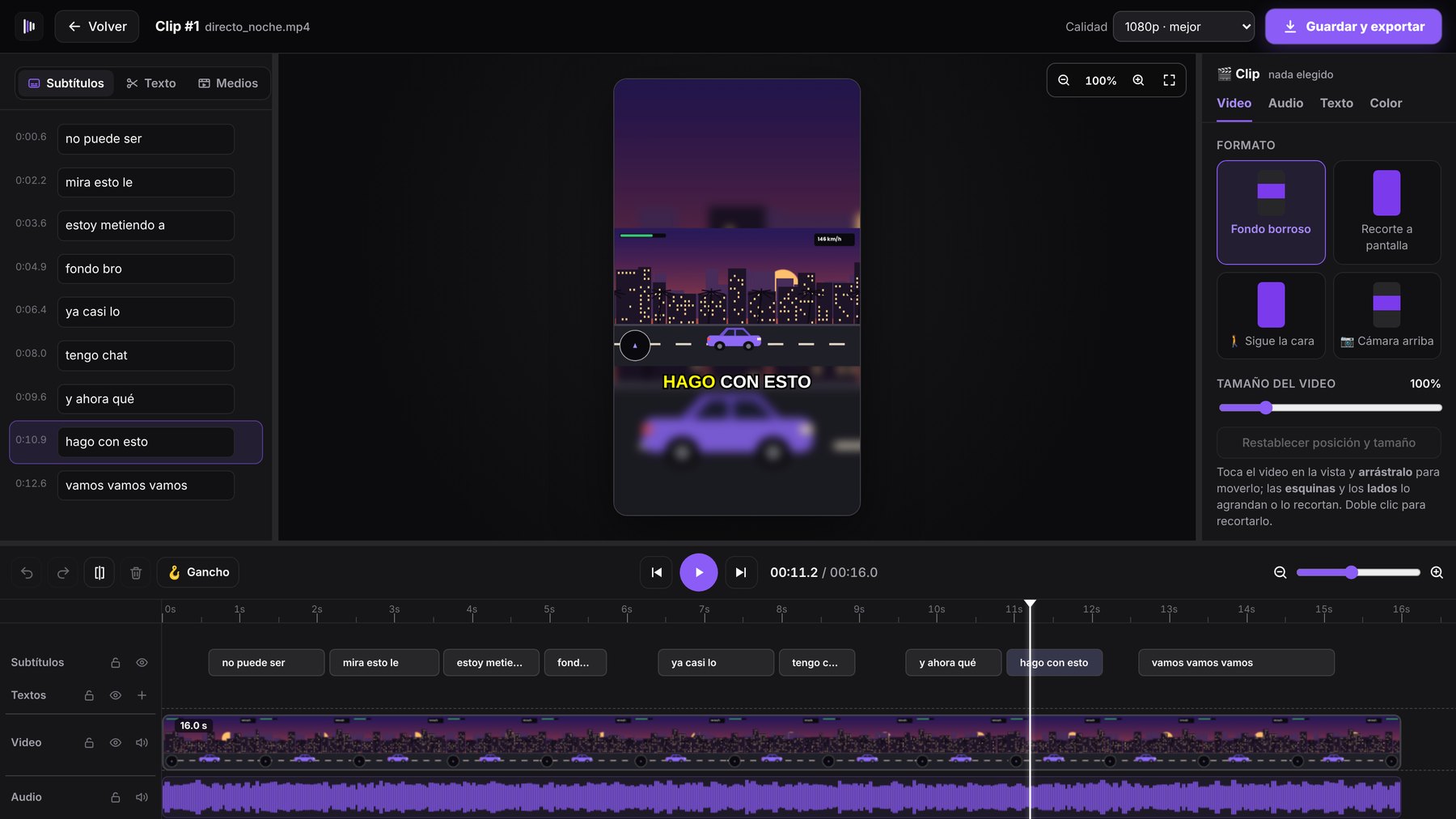
Your clips come out ready to post. If you want to tweak something, the editor is right there, as easy as the one on your phone.

CorusClip
CorusClip editor
Edit subtitles

Fix any word and it updates in the video.

Timeline

Cut, move and split, like any video editor.

Export in 1080p

Vertical 9:16, ready for TikTok, Reels and Shorts.

Compare

4× more video for half the price

Popular clip tools charge per minute of video. A single stream can use up a whole month.

CorusClipOpusClip
Price per month$14.99 Creator · $24.99 Streamer
from $8.25/month on yearly plans
$15 Starter · $29 Pro
Video included20 h of video (Creator) · 80 h (Streamer)2.5 h (Starter) · 5 h (Pro)
Built for streamersYesGeneral purpose
Watch live streamsYesRecorded videos
Where it runsYour Windows PC (no upload wait)In the browser (upload first)
Free trial5 h of video, up to 3 videos (no card, with watermark)60 min (with watermark)

OpusClip prices and limits from public sources, August 2026; they may change. OpusClip is a trademark of its owner. CorusClip is not affiliated with it.

Pricing

Simple pricing, no surprises

Launch offer: $5 off your first 3 months on monthly plans if you join before December 31, 2026. After that, the regular price applies.

Free trial

See what it does with your own streams.

$0
 
  • 5 hours of video (up to 3 videos)
  • All features · no card needed
  • Clips with a small "Made with CorusClip" watermark
Start free
Most popular

Creator

For clipping your streams every week.

$9.99/month
 
  • No watermark
  • 20 hours of video per month
  • Live mode, editor and all updates
Get Creator

Streamer

For long streams, every day.

$19.99/month
 
  • No watermark
  • 80 hours of video per month
  • Live mode, editor and all updates
Get Streamer

Hours renew every month. Cancel anytime.

💳 Card Apple PayG Pay🔒 Secure checkout by Polar
Requirements

Will it run on my PC?

If your PC can stream or play, it can run CorusClip.

Minimum

  • Windows10 or 11 (64-bit)
  • CPU4 threads
  • RAM8 GB (4 GB works with short videos)
  • Disk5 GB free + your videos
  • InternetThe first time (to download the voice model)

Recommended

  • CPU6 cores or more
  • RAM16 GB
  • GPUOptional. NVIDIA, Intel or AMD speed up video; NVIDIA also speeds up subtitles.
  • MacNot available yet

Questions

Do I need to know how to edit?

No. CorusClip picks the moments and makes the clips for you. The editor is there only if you want to change something.

Which games does it work with?

Any game. It works best with streams where you talk and react.

What counts as an hour of video?

The length of the videos you give CorusClip. A 2-hour stream uses 2 hours. Creator includes 20 hours per month and Streamer 80, renewed every month.

Do I need ChatGPT or any other subscription?

No. Everything is included. You don't need API keys or extra accounts.

What languages does it support?

Subtitles and titles in English and Spanish, among others. You choose the language of each video.

Do my videos get uploaded anywhere?

No. Your videos are processed on your PC.

Can I use it on more than one PC?

Each license works on one PC. You can move it to another PC from the app whenever you want.

How do I cancel?

From the link in your purchase email, in one click. You keep access until the end of the period you paid.

Can I try it before paying?

Yes. Download CorusClip, open it and press "Try free" with your email: you get 5 hours of video (up to 3 videos) with all features, no card. If you like it, subscribe and paste your key in the app.
Your next viral clip
is already in your last stream.

Try it free with 5 hours of video. No card, no editing, no waiting.

Try it free · 5 h of video See pricing
$9.99/month · launch offer Try free